
The PM Youth Chromebook Scheme Record Not Found Error is a common issue faced by students trying to check their records on the official Chromebook Scheme portal. Many students enter their board name, roll number, and B-Form number, but the website displays the message “Record Not Found” or “No Record Matches These Details.”
This Chromebook Scheme Record Not Found Error can occur because of an incorrect roll number, a B-Form mismatch, an incorrect board selection, or student data that has not yet been uploaded to the portal. However, the error does not automatically mean that a student has been rejected from the PM Youth Chromebook Scheme.
PM Youth Chromebook Scheme Record Not Found Error 2026
When a student enters the required information, the portal attempts to match the details with the student records available in its database. If the entered information does not match an available record, the website may display the Record Not Found message.
7 Reasons For Chromebook Scheme Record Not Found
The following are possible reasons why students may be unable to find their records on the PM Youth Chromebook Scheme portal.
1. Incorrect Roll Number
Entering the wrong roll number is one of the first things students should check. Some students accidentally enter their school registration number, a previous examination roll number, or an incorrect number from their result card.
Always use the examination roll number required by the official portal. Check your original roll number slip or result card before entering the information.
2. Wrong Education Board Selected
Students must select the board through which they appeared in their examination. For example, a student who appeared through BISE Lahore should not select BISE Multan or another education board.
Selecting the wrong board can prevent the portal from matching the student’s record.
3. B-Form Number Mismatch
The B-Form number must match the information associated with the student’s official record. A typing mistake or an incorrect digit can cause the verification process to fail.
Carefully check all 13 digits of your B-Form or Child Registration Certificate (CRC) number before submitting the form.
4. Student Data Has Not Been Uploaded
Another possible reason is that the relevant student data is not yet available in the portal. If the responsible education board has not provided or updated a particular record, the student may be unable to find it.
Students should check with their school administration or education board to confirm whether their information has been submitted. Do not assume that waiting a few days will necessarily resolve the issue.
5. Student Record Is Not Included in the Available Data
A student’s record may not appear if it was not included in the data available to the scheme’s portal. This could require confirmation from the school or the relevant education board.
Students should ask their school whether their information was submitted and whether they meet the scheme’s officially announced eligibility criteria.
6. Private School Student Record
If the official scheme rules restrict eligibility to students enrolled in government schools, private school students may not be eligible under those rules.
However, students should confirm the eligibility requirements published for the 2026 scheme rather than relying on the error message alone. A Record Not Found message is not, by itself, proof of ineligibility.
7. Typing Mistakes or Incorrect Examination Details
Small mistakes can also cause problems during verification. These include entering an incorrect roll number, selecting the wrong examination session, or submitting a B-Form number with a typing error.
Review every field before submitting your information again.
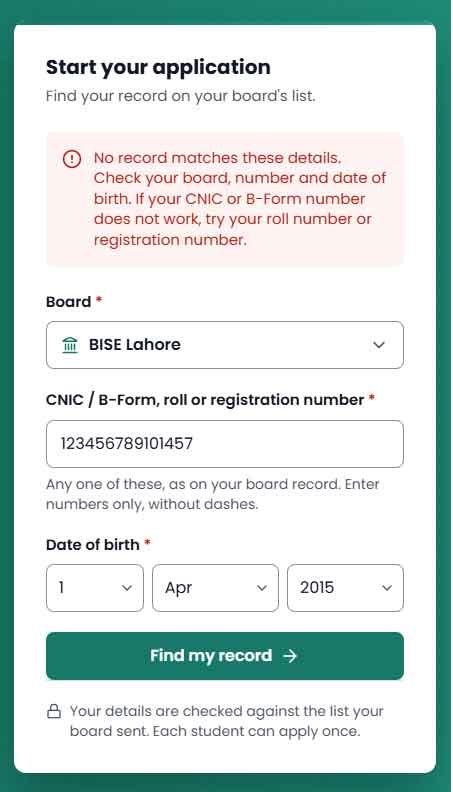
How to Fix Chromebook Scheme Record Not Found Error 2026
Follow these steps to troubleshoot the issue.
Step 1: Check Your Original Result Card
Keep your official examination result card or roll number slip ready. Use the examination details required by the scheme rather than relying on memory.
Step 2: Open the Official Chromebook Portal
Visit the official website:
https://pmychromebooks.ibcc.edu.pk/
Avoid unofficial websites that ask for personal information.
Step 3: Select the Correct Board
Choose the education board through which you appeared in the relevant examination.
Step 4: Enter Your Roll Number
Type the correct examination roll number exactly as printed on your official document. Make sure you are using the examination session and class required by the portal.
Step 5: Verify Your B-Form Number
Enter your B-Form number carefully. Check every digit before submitting the information.
Step 6: Submit Your Details Again
Review the information and submit it through the official portal. If your record appears, check the displayed details for accuracy and follow the instructions provided by the website.
Step 7: Contact Your School if the Error Continues
If the portal still shows Record Not Found, contact your school administration. Ask whether your student information was submitted and whether your record matches the information held by the education board.
What to Do If All Your Details Are Correct
If you have checked your roll number, board selection, and B-Form number but still cannot find your record, take the following actions:
- Contact your school head: Ask the school to verify your examination details and confirm whether your record was submitted.
- Contact your education board: If your school confirms that the information is correct, request guidance from the relevant board about missing or incorrect student data.
- Follow official IBCC guidance: If the issue concerns the scheme portal or its verification process, use the official contact or support information published by IBCC.
- Keep your documents ready: Your result card, roll number slip, and B-Form may help the relevant office investigate the issue.
- Avoid paying agents: Do not pay anyone who promises to add your name, change your merit status, or fix your record without official authorization.
There is no need to share your B-Form number or other sensitive information publicly on social media while seeking help.
Chromebook Scheme Record Not Found – Quick Checklist
Before checking your record again, make sure you have completed the following checks:
-
Correct examination roll number entered.
-
Correct education board selected.
-
B-Form number checked carefully.
-
Correct examination session selected.
-
Eligibility criteria reviewed.
-
School administration contacted if necessary.
-
Official PM Youth Chromebook portal used.
Frequently Asked Questions (FAQs)
1. What does Record Not Found mean on the Chromebook Scheme portal?
It means the portal could not find a matching record using the information submitted. The cause may be incorrect details, missing student data, or another verification issue.
2. Does Record Not Found mean I am rejected?
No. The message alone does not confirm rejection. Verify your details and contact your school or education board if the problem continues.
3. How can I fix the Chromebook Scheme Record Not Found error?
Check your roll number, education board, B-Form number, and examination session. If everything is correct, ask your school to verify your record and contact the relevant board if necessary.
4. Which roll number should I enter for the Chromebook Scheme 2026?
Use the examination roll number specified in the official portal’s instructions. Check your original result card or roll number slip to avoid entering the wrong number.
5. Can private school students apply for the PM Youth Chromebook Scheme?
Eligibility depends on the officially announced scheme rules. If the scheme is restricted to government school students, private school students will not qualify under that requirement.
6. What should I do if my record is missing even though I am eligible?
Ask your school to verify your student information and whether it was submitted to the relevant authority. If necessary, contact your education board or follow the official IBCC support procedure.
7. Is there a fee to fix the Record Not Found error?
Students should not pay unofficial agents to fix a missing record. Use the official portal and authorized support channels, and check the published scheme instructions for any legitimate fees, if applicable.
8. What is the official Chromebook Scheme website?
The official portal provided for the PM Youth Chromebook Scheme is https://pmychromebooks.ibcc.edu.pk/. Always verify the website address before entering personal information.